
Metric Availability & Meta's Transition
It is important to note that metric availability is determined by Meta and is outside of Pressboard’s control. In late 2025, Meta began consolidating "Impressions" and "Plays" into a single, unified metric: Views. However, Meta has not yet released the "Views" metric for every API endpoint. For example, Instagram Post vs. Instagram Reels - which are considered two separate endpoints, with their own set of metrics and dimensions. While we wait for Meta to finalize this rollout, we recommend using "predecessor" metrics to ensure your reporting remains consistent.
What does this mean in the Pressboard UI?
For users who have Data Admin / Data Explorer permissions, you will be able to see these specific data cubes/endpoints and all available metrics within the Widget Library.
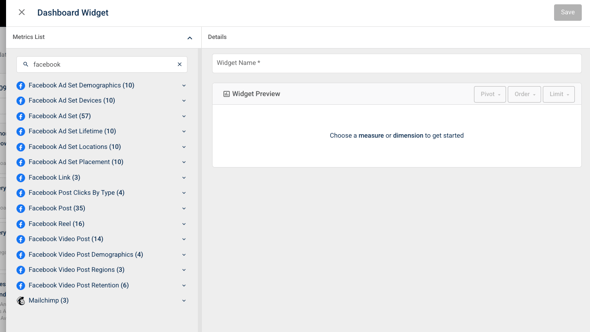
These widgets form the foundation of every report component, highlight, or chart metric you create. Because each data source can have one or more "cubes/endpoints" (separate lanes of data), it is critical to refer to this guide to ensure you are pulling the correct results for your Facebook and Instagram campaigns.
Navigating the Data: The "Three Lane" Rule
To ensure accuracy, think of your data as living in separate "lanes" or cubes. Choosing the right cube/endpoint is essential for pulling the correct results.
- Instagram (Organic Only): The Instagram Post, Instagram Reel, and Instagram Story endpoint in Pressboard contain organic results only.
- Facebook (Combined or Split): Facebook enpoints differ, and often allow you to see combined paid and organic results, or separate them into specific "Organic" vs "Paid" metrics, eg. Facebook Post Organic Views.
- Dark Ads & Boosted Content: All paid dark ads and boosted Instagram content are strictly located under the Facebook Ad Set endpoint.
Comparing "Views" to Interim Metrics
Since "Views" now applies to all content types and is measured at a 1ms threshold, you will see variances when comparing them to interim metrics:
|
Metric Name |
Content Type |
How it is Measured |
Why the Numbers Differ? |
|
Views (New) |
All Content |
Counted at a 1ms threshold. |
This is the most inclusive count, results may look higher than previous reports. |
|
Video Views |
FB Video Post |
Historically measured at a 3s threshold. |
Because the user had to stay for 3 full seconds, these numbers will look lower than the new 1ms "Views". |
|
Impressions |
All Formats (Virtually) |
Counted when content enters the screen. |
Currently used for Dark Ads and Boosted content. Numbers may differ as Meta aligns its definition of a "View" versus a screen appearance. |
|
Total Plays |
FB Reels |
Counted when a video starts to play. |
Currently the interim metric for Facebook Reels. This only triggers on video starts, whereas "Views" applies to all content. |
Widget & Interim Metric Reference (2026)
Use this table to find the correct reference cube in the Pressboard Widget Library:
|
Content Type |
What You See in Meta |
What's Included? |
Reference Endpoint in Pressboard |
Available Metric in Pressboard |
|
|
Views |
🌱Organic 🚀Boosted |
Facebook Post API |
Facebook Post Views |
|
|
Views |
🌱Organic 🚀Boosted |
Facebook Reels API |
*FB Reels Total Plays |
|
|
Views |
🌱Organic 🚀Boosted |
Facebook Video Post API |
*Facebook Video Post Video Views |
|
|
Views |
🌱Organic only |
Instagram Post API |
Instagram Post Views |
|
|
Views |
🌱Organic only |
Instagram Reels API |
Instagram Reel Views |
|
|
Views |
🌱Organic only |
Instagram Story API |
Instagram Story Views |
|
|
Views |
🚀Boosted 💰 Paid Ads
|
Facebook Ad Set API |
*FB Ad Set Impressions |
|
|
Views |
🚀Boosted 💰 Paid Ads
|
Facebook Ad Set API |
*FB Ad Set Impressions |
 Facebook Post
 Instagram Post
 Boosted IG Post/Reel
 Dark Ads
*Note: Once Meta makes the "Views" metric available for these specific cubes via the API, we will update our library accordingly.
If you have any questions, please reach out to the customer success team.